Most of my coding agents live in herdr, a terminal workspace built for running a lot of them at once. It knows each agent’s state: working, blocked on a question, finished, or idle. On the desktop that’s great. Away from the desk, it’s a problem, because an agent that’s blocked on a yes-or-no question stays blocked until I’m back.
I wanted my phone to fix that. The options I had didn’t fit how I actually work:
- herdr had no good mobile app. It’s a terminal app, and a terminal is a rough fit for a phone.
- Claude’s Remote Control works, but one account at a time. I run more than one Claude account, and each one is its own silo.
- Not every agent is Claude. I also run Codex, Gemini and Grok agents. Each vendor’s app only shows that vendor’s agents.
I wanted one app that shows every agent, whoever made it, and that only my own devices can reach. So I built herdr-pocket.
What it is
herdr-pocket is one Go binary that runs on the desktop next to herdr, plus a Svelte app you install on your phone from the browser as a PWA. It talks to herdr over herdr’s local socket API, and it serves the app only on my Tailscale network.
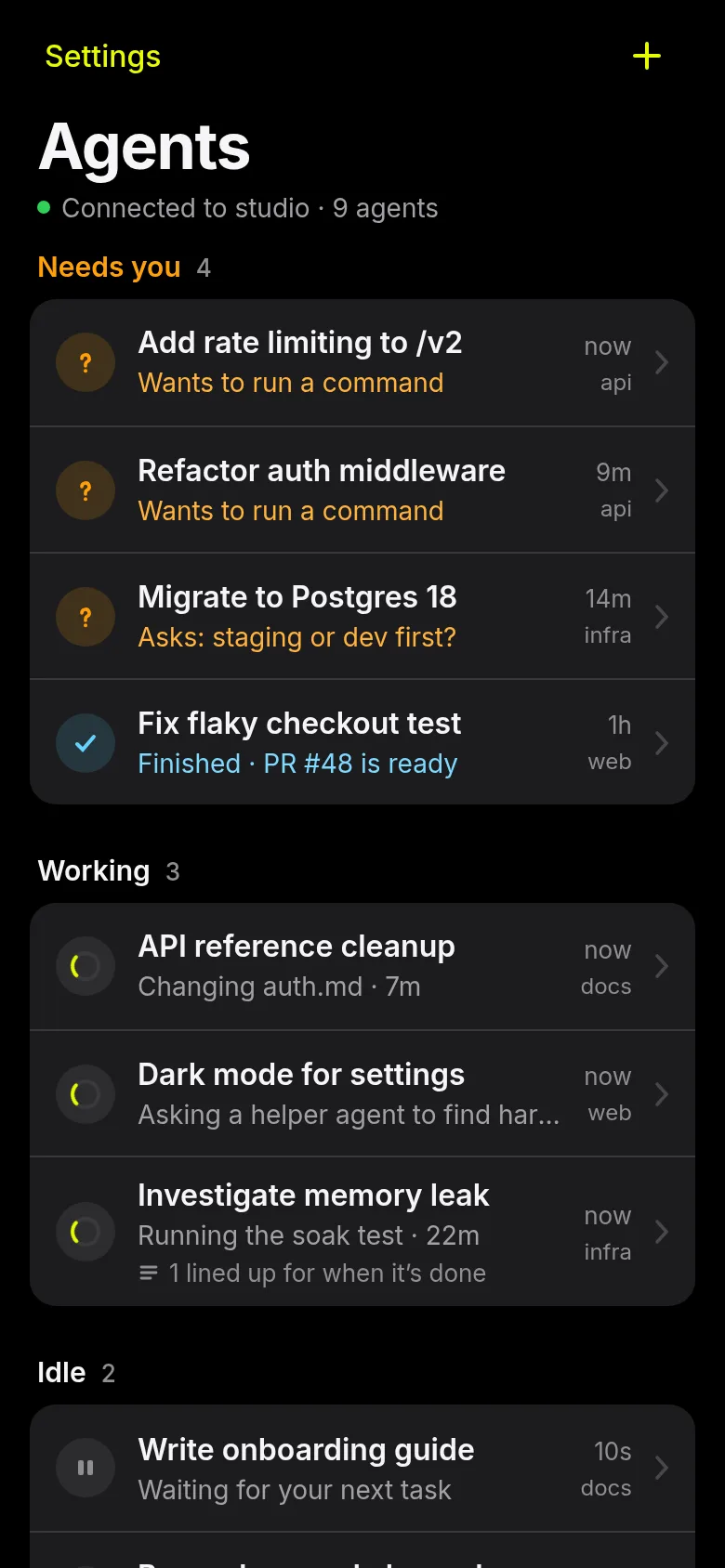
The home screen is a list of every agent, sorted by what needs me. Agents waiting on an answer come first, then the ones that finished, then the ones still working, then the idle ones. Every row says what’s going on in plain words: “Wants to run a command”, “Asks: staging or dev first?”, “Finished · PR #48 is ready”.
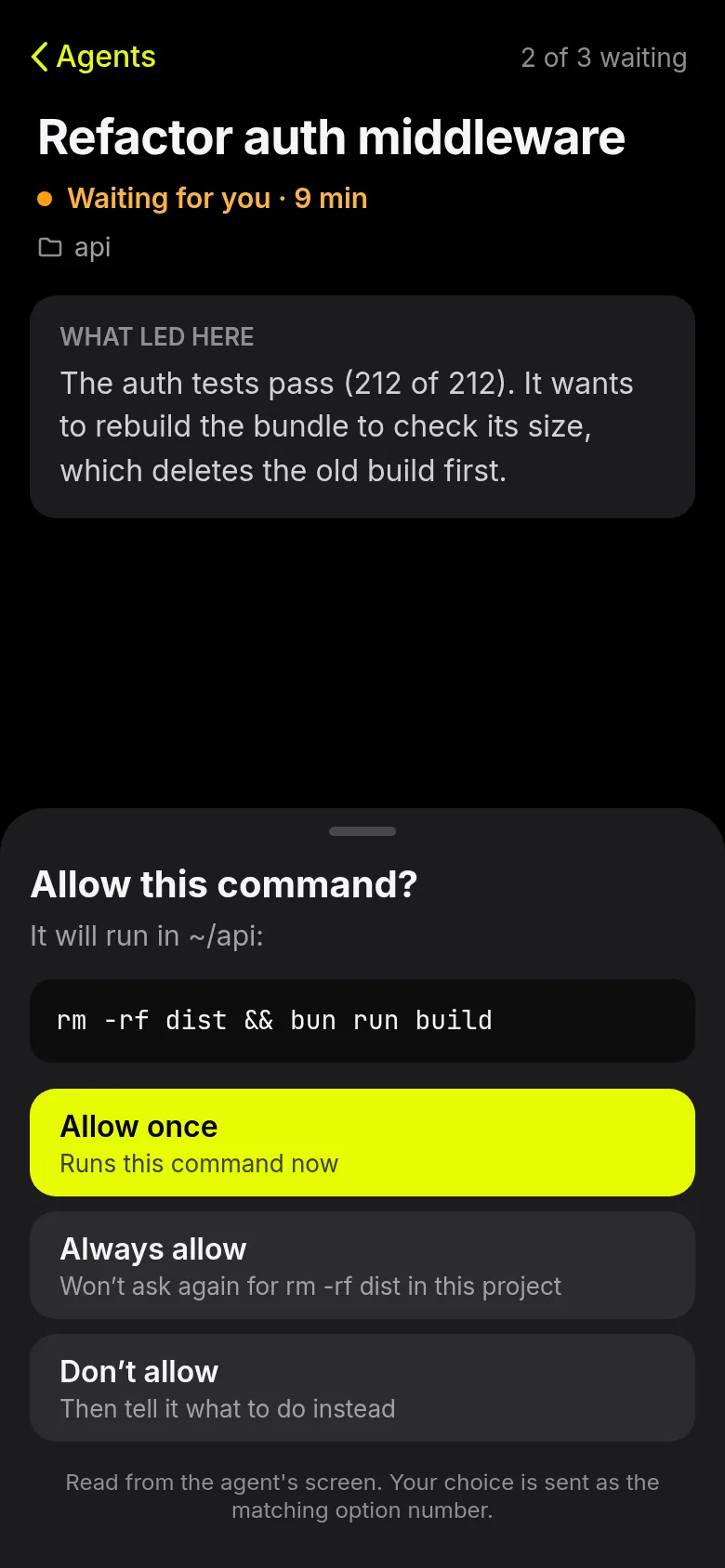
Tap an agent that’s waiting and you get the question as a sheet: the exact command, where it’ll run, and one button per choice that says what happens if you tap it.
The rest of the app grew from that list:
- A push when an agent gets blocked, with the app closed and the phone locked. Tap it and you land on that agent. If I’m sitting at that agent on the desktop, the push waits.
- Answer from the notification. A permission prompt for a command gets two buttons, “Allow once” and “Don’t allow”. Never “Always allow”. That’s too much to hand out from a lock screen. This one just landed, and I haven’t tried it on a real prompt yet.
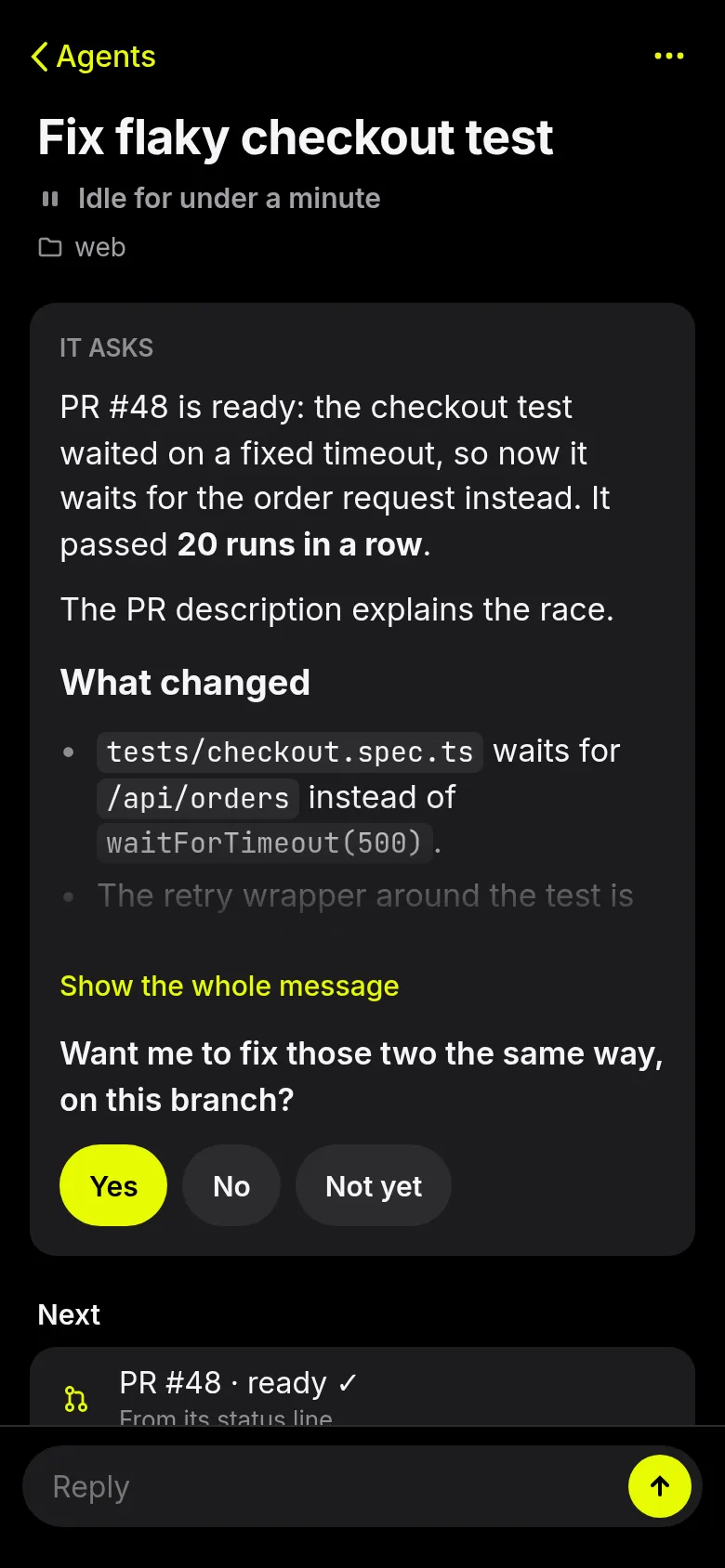
- The agent’s whole last message, at reading size. I added this after catching myself opening the terminal view on my phone and squinting at tiny print to figure out what an agent had just said. When the message ends in a question, Yes / No / Not yet buttons sit under it.
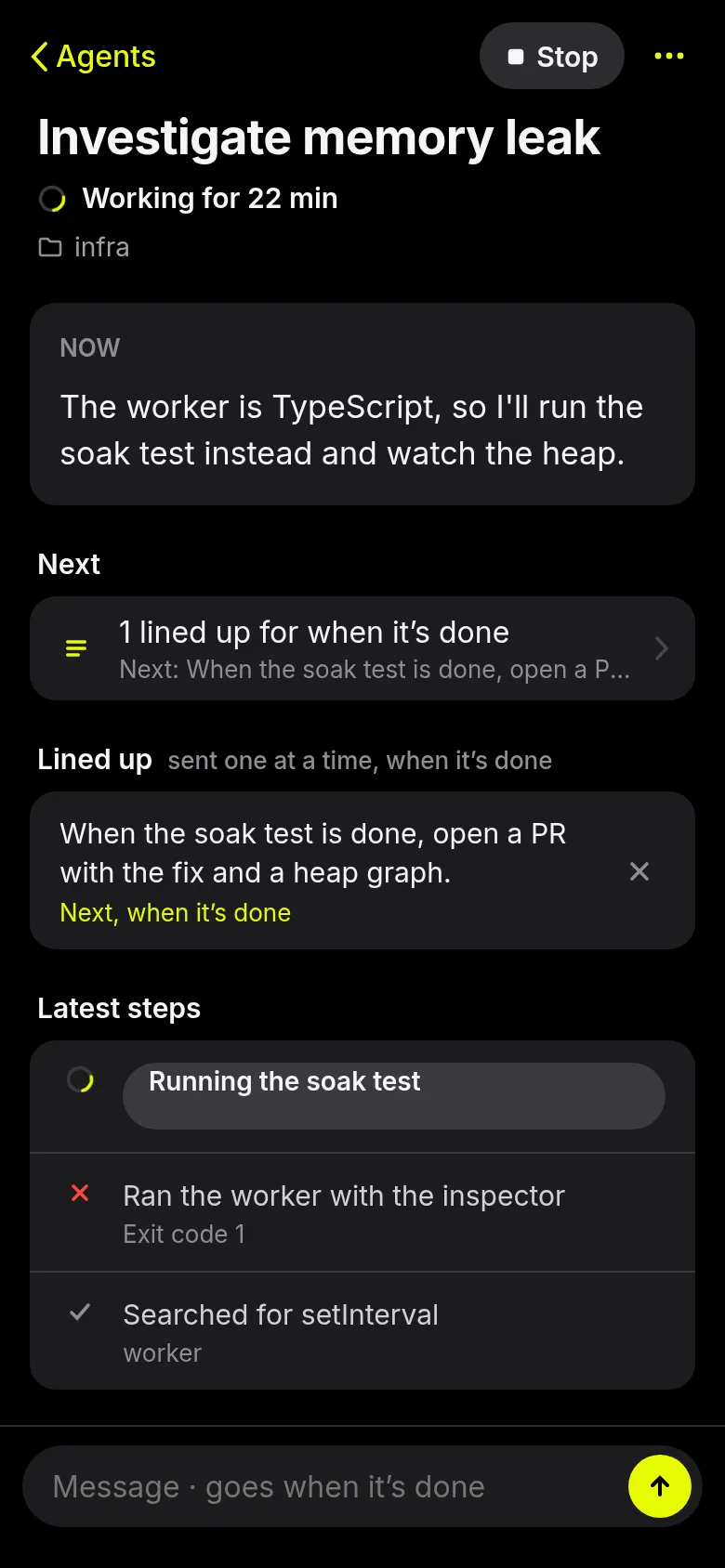
- Work lined up for later. If an agent is busy, a message I send waits on the server until the agent is done, then goes out. That way I can line up the next task while I’m thinking of it, and the agent doesn’t sit idle waiting for me to remember.
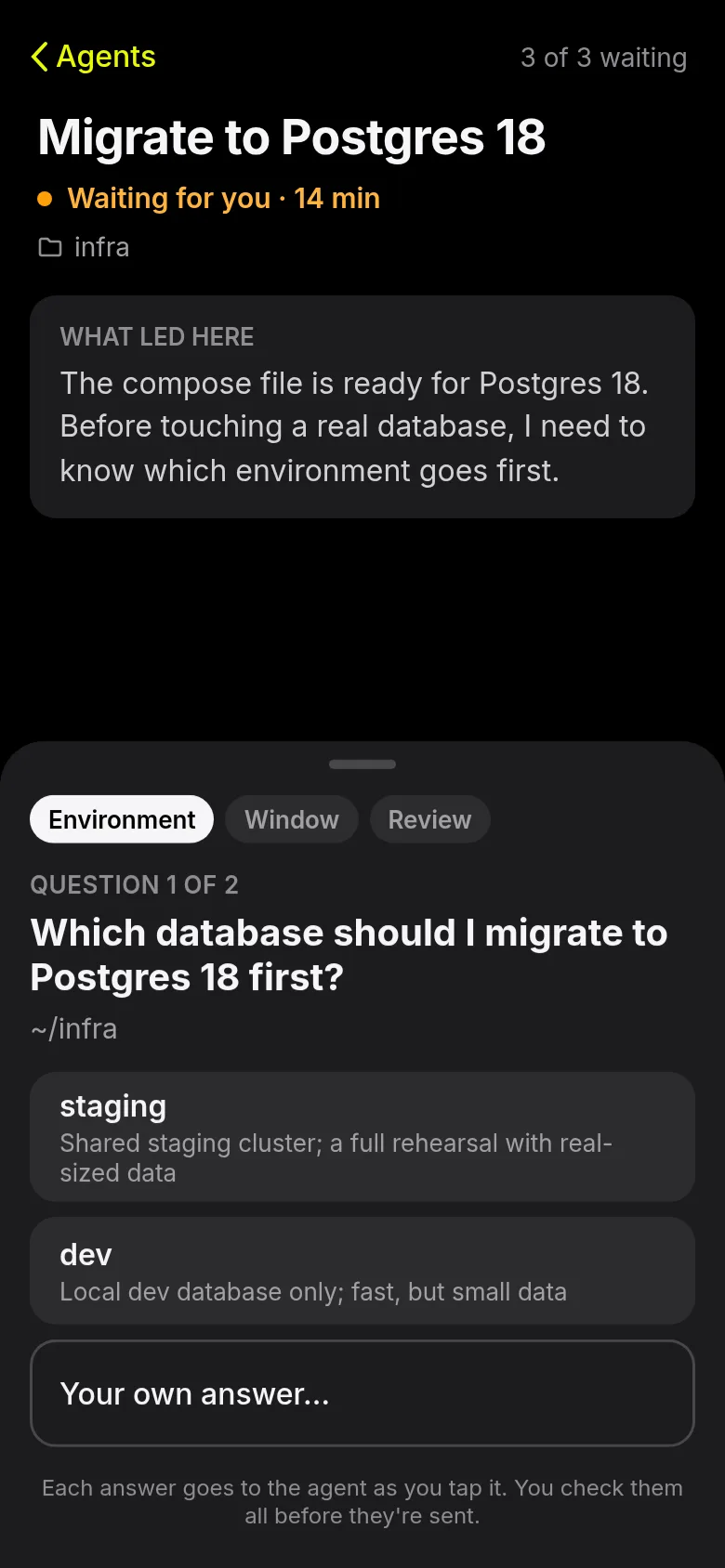
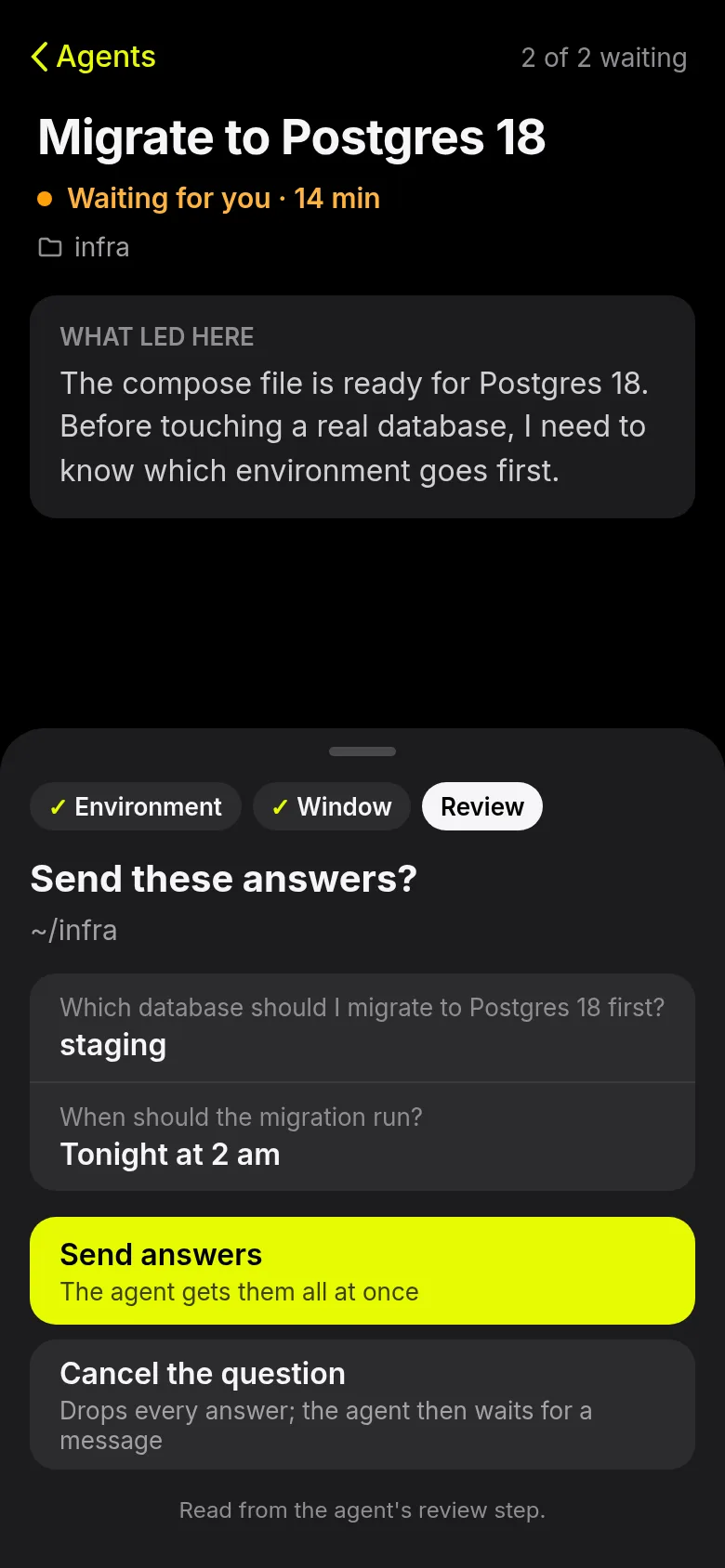
- Claude Code’s multiple-choice questions. When an agent asks me something with options, I get the same sheet as a permission prompt: one step per question, a box for my own answer, and a review before anything goes back.
The questions took the most care. Claude Code only writes a question to its transcript after it’s answered, so while it’s open the screen is the only source. The app reads the dialog off the screen and answers one key at a time. After every key the server re-reads the screen and checks it shows what that key should have done. If anything looks off, it stops and tells me, rather than sending the next key into whatever is now on screen.
Every agent, every account
The multi-account, multi-vendor part is the reason this exists, so it’s built into how the app gets its data.
herdr already treats every agent the same way, whichever company made it. herdr-pocket gets the list, the states and the screen contents from herdr, so a Codex agent shows up next to a Claude one with no special case.
For Claude Code agents it goes further. herdr knows each agent’s session, so herdr-pocket reads that session’s transcript and turns it into plain words: what the agent is doing now, the steps it took (“Ran the unit tests: 18 passed”), and the exact command behind a permission prompt. It looks in every Claude config directory I use, so all my accounts show up in one list. For agents without a transcript, it reads the screen and parses the options from there. When it can’t parse them with confidence, it shows the screen and the raw keys instead of guessing.
Only on my tailnet
I didn’t want a cloud relay, a third-party account, or a port open on my router. The Tailscale SSH setup I wrote about last year already gets me to my desktop from anywhere, so I built on that.
The binary embeds its own Tailscale node using Tailscale’s tsnet library. It joins my tailnet as its own device, with its own HTTPS certificate, and listens nowhere else. There’s no localhost port and nothing on the LAN. Every request is checked against the Tailscale identity of the device that sent it, so there’s no separate login or password.
A few other rules I set early:
- Push payloads never carry prompt or output text. A push carries the agent’s name, its workspace and its state, encrypted for my phone, so Google only relays ciphertext.
- The server has no run-a-command method. It only calls herdr’s typed methods: prompt, answer, send keys. Typing into a shell pane is still shell access, so only Tailscale users I allow (by default, just me) can send input at all.
- Every answer is checked against the screen first. Before sending an option number, the server re-reads the agent’s screen and makes sure the question hasn’t changed. If it has, nothing is sent and I’m told why.
- Every action is audited. Each one goes in a log with who, when and what, plus a hash of the text, never the text itself.
Keeping it quiet
I wanted it to feel like a normal phone app and stay quiet, not a dashboard of tiles. That comes from what agents do to my attention. Every agent turn ends with a question for me, and across a day of parallel threads that adds up to hundreds. An app can’t make those questions go away, but it can make each one take seconds instead of a trip back to the desk. So the list has no output previews and no animation beyond a spinner on working agents. It shows who needs me.
How it was built
Agents wrote most of it. I signed off the spec and mockups of the screens before each piece was built. Then each milestone ran as a workflow: agents build in parallel, one integrates, three review from different angles, the fixes go in, and a verifier checks the result against the spec. That last step is the verification gap in practice: the agents write the checks, but the spec saying what “correct” means is mine. It went from spec to running on my phone in about three days.
The best moment was testing push for real. The agent coordinating the build was itself running in herdr. To get a real blocked agent without typing into anything, it asked me a question, which blocked its own pane. My locked phone buzzed, I tapped the notification, answered from the phone, and the agent carried on.
Try it
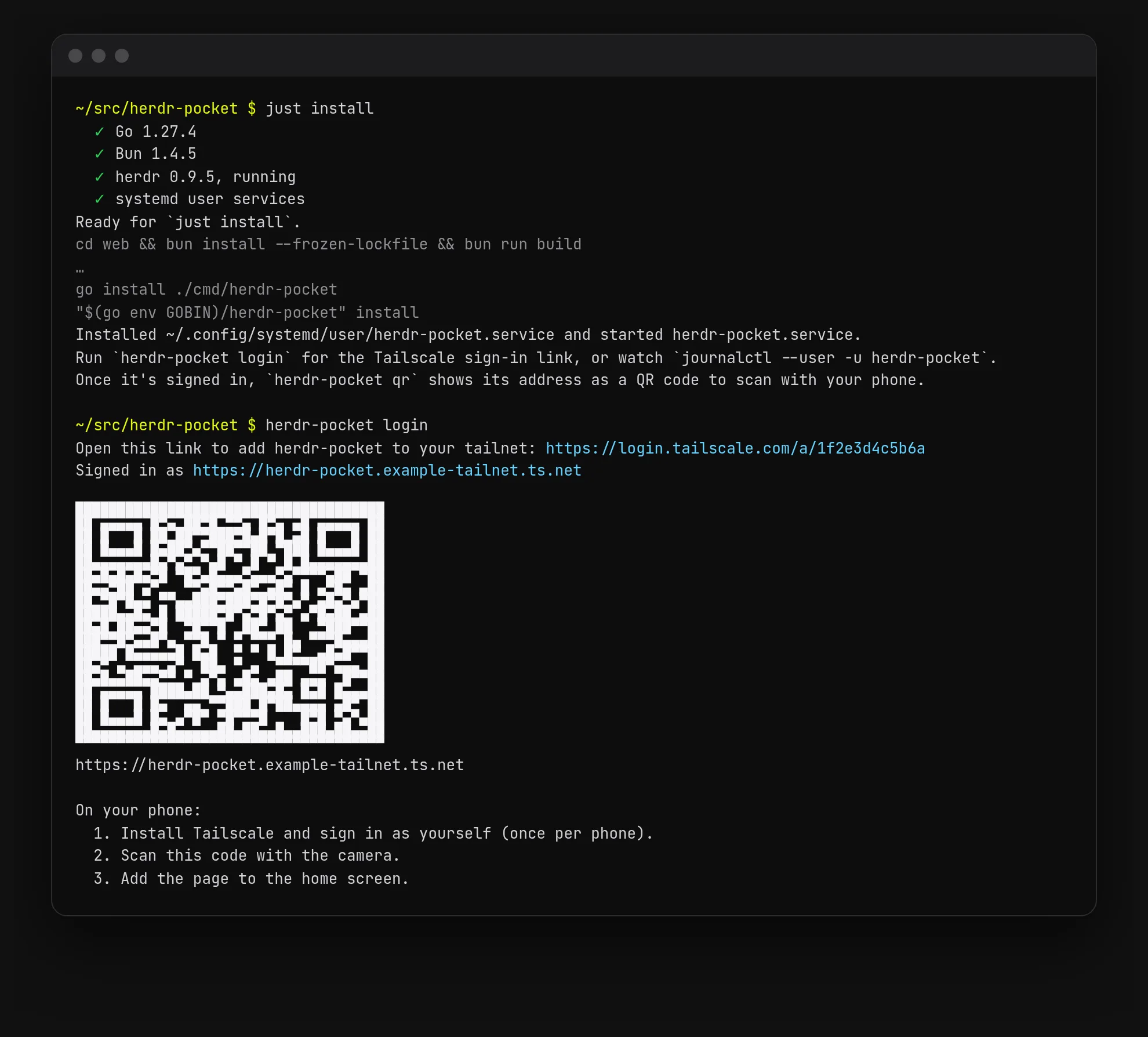
herdr-pocket is open source under the MIT licence: github.com/tsoporan/herdr-pocket. The README has the details. If you run herdr on Linux and have a Tailscale account, setup is two commands. just install checks for what it needs, builds the binary and starts it as a user service. herdr-pocket login adds it to your tailnet and prints a QR code for your phone.
It’s built for and tested on Android. iOS should work, since it’s a standard PWA, but I haven’t tried it. Still to come: Claude Code’s pick-several questions, which for now fall back to the agent’s screen, and a view of the whole machine. It already does what I built it for: I can step away from the desk and still answer my agents.